mlb_blog, mlb_blog_en, myLifeBase
Meet MyLifeBase: A Brief Overview of What’s Inside
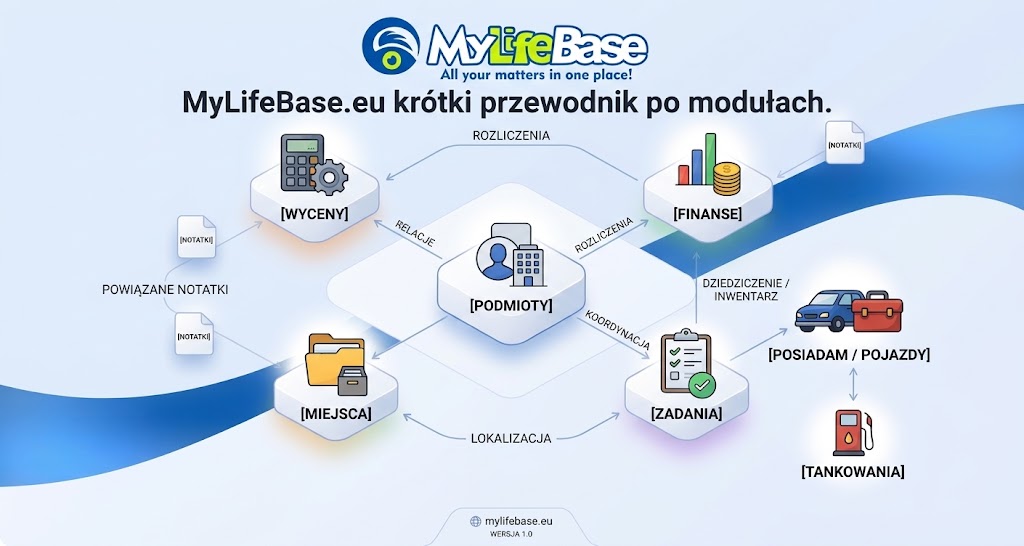
Most everyday organizational challenges stem not from a lack of tools, but from their fragmentation. Contacts scattered across a phone, plans buried in spreadsheets, estimates drafted in text documents, and receipts or warranty cards forgotten in drawers all contribute to informational chaos. In such an environment, maintaining an immediate, holistic view of your actual affairs becomes nearly impossible.
MyLifeBase was designed to solve this fundamental problem. Instead of creating isolated silos, the software seamlessly integrates key areas of personal and professional life into a single relational ecosystem. Every record—whether a task, a vehicle, a note, or a financial transaction—can be categorized, filtered, and interconnected with other elements across the system.
MyLifeBase Modules and Capabilities
1. Entities (Podmioty) – Relational Contact & Counterparty Directory
A central hub for managing your entire network of individual contacts, businesses, public institutions, and contractors.
- Categorization & Filtering: Flexible category assignments allow instant database filtering based on custom criteria.
- Granular Records: Comprehensive tracking of contact details, registration IDs, notes, and custom descriptions.
- Cross-Module Links: Horizontal relationships between entities, with direct links to Places (e.g., office addresses, document storage locations) and Notes.
2. Finance (Finanse) – Full Cash Flow & Budget Control
Dedicated to tracking and categorizing both incoming revenue and expenditures—covering current, historical, and forecasted operations.
- Categorization: Operations structured into customizable budget categories with advanced filtering.
- Automation & Scheduling: Built-in alerts for recurring commitments (subscriptions, insurance policies, taxes) alongside loan repayment tracking.
- Analytics: In-depth balance summaries, comparative statistics, and visual charts illustrating financial trends over time.
3. Tasks (Zadania) – Multi-Level Planning & Cost Estimation
An advanced module designed to manage projects, everyday to-dos, and commercial client orders.
- Hierarchical Structure: Native support for multi-tier breakdowns (Task / Subtask / Nested Subtask).
- Budgeting & Progress: Estimate individual subtask costs, compute total project budgets, track percentage completion in real time, and generate comprehensive summary sheets.
- Categorization & Filtering: Group and filter tasks by specific domains or priorities.
- System Integrations: Seamless links to Entities (assignees / clients), Finance (linked expenses and invoices), Places / Resources, and Notes.
4. Price List (Cennik) – Central Service & Product Catalog
A foundational module serving as the cost-calculation engine for quotes and ongoing operations.
- Item Details: Records item names, unique SKU/codes, units of measure, unit pricing, minimum order quantities (MOQ), product URLs, and detailed technical descriptions.
- Commercial Context: Directly links items to suppliers (Entities), tracks active/inactive item status, and logs price validity dates.
- Organization: Categorization features supporting fast search and multi-level filtering.
5. Estimates & Quotes (Wyceny) – Project Costing & Quoting
Built on top of the Price List data, this module allows users to generate detailed quotes and project costings with minimal friction.
- Costing Breakdown: Calculate aggregate costs or break estimates down into granular subtasks, services, and billable materials.
- Parameters & Validity: Define completion stages, document scope of work, set quotation expiration dates, and apply filterable categories.
- System Integrations: Connects directly with Entities (target clients), Finance (revenue projections), Places, and Notes.
6. Notes (Notatki) – Structured Knowledge & Meeting Records
A dynamic workspace for capturing thoughts, agreements, and reference knowledge with contextual links.
- Organization: Assign notes to custom categories (with filter support) and link them to specific Entities.
- Reminders: Built-in notification mechanism to surface critical notes whenever timely review is needed.
- Data Export: Instant document export to standard formats: PDF, HTML, and TXT.
7. Places (Miejsca) – Physical and Digital Asset Locator
Eliminates lost paperwork and forgotten storage sites by mapping physical and digital storage infrastructure.
- Resource Typology: Clearly distinguishes between directory containers (folders, shelves, archive boxes) and specific items (files, documents, objects).
- Metadata: Assign custom names, descriptive icons, detailed location paths, and links to relevant Entities.
- Maintenance Reminders: Set actionable alerts for required periodic tasks (e.g., physical archive audit, routine cleanup, scheduled shredding).
- Filtering: Categorize and filter storage locations with ease.
8. Inventory (Posiadam) – Asset Registry & Lending Tracker
A centralized inventory covering valuable possessions: electronic hardware, specialized tools, book collections, digital media, and real estate properties.
- Categorization: Classify assets across customizable categories with instant filtering.
- Lending & Return Tracker: Full custodial tracking—logs who borrowed an item (Entity), checkout dates, expected return deadlines, and overdue return flags.
9. Vehicles (Pojazdy) – Specialized Fleet Records
A dedicated fleet management extension directly integrated with the asset inventory.
- Automatic Synchronization: Any vehicle added here is automatically recognized and indexed in the core Inventory (Posiadam) module.
- Technical Registry: Complete vehicle profile detailing operational specs, technical documentation, and inspection milestones.
- Fleet Categorization: Organize and filter multi-vehicle setups by type, utility, or user.
10. Refueling (Tankowania) – Fuel Log & Travel Analytics
An operational module linked to the vehicle fleet to log and monitor fuel efficiency and travel expenses.
- Key Metrics: Operation date, odometer readings / trip mileage, fuel quantity (liters/gallons), unit price, total transaction amount, and trip purpose/description.
- Data Processing: Advanced sorting and category filtering, providing accurate calculations of average fuel consumption (l/100km or MPG) and real trip costs.
Relational Power: Context Over Silos
The core strength of MyLifeBase is not merely the breadth of its tools, but how seamlessly they communicate. Rather than operating in isolated bubbles, your information forms a cohesive relational web:
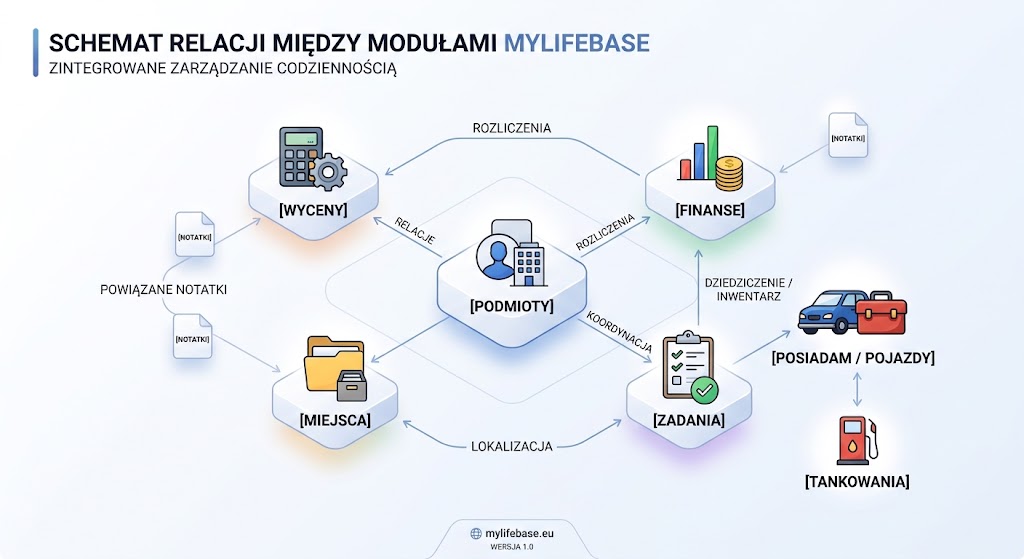
By leveraging universal categorization, time-sensitive reminders, and bidirectional links across modules, MyLifeBase removes redundant data entry and delivers instant access to the full context of every single record.